Portfolio Design #04: Content Management (Database, Caching, and Storage)
Introduction
In my previous post on the portfolio’s API architecture, I covered the request handling, middleware, and API design for my portfolio and blog. This post dives deeper into its data layer: how content is stored, keeping latency low through caching, and how media files are managed.
For a small blog with minimal traffic, the data layer choices might seem overkill. However, I wanted to build something that could scale gracefully while remaining simple to maintain. The key principles were:
- Low latency: Sub-250ms response times even under load
- High availability: Prioritize reader access over strict consistency
- Resource efficiency: Keep memory and storage usage minimal
- Simple operations: Easy to understand and maintain
Relational Database Design
Why PostgreSQL?
For my self-hosted blog, there weren’t many “relational” requirements. I own all the blogs, so complex cross-table queries weren’t necessary. I also wanted to keep performance top-notch while self-hosting.
While a distributed NoSQL database (e.g., MongoDB) would have been easier to configure and would have little resource overhead, I knew I was going to host this in a simple single-server environment, so I wouldn’t reap the benefits of NoSQL (ease of horizontal scaling). Having a strong, structured Post: {id, author, excerpt, content, ...} that I could easily model alongside internal types was most ideal.
I went with PostgreSQL because it’s: - Open-source - Structured and type-safe - Has excellent indexing capabilities (B-Tree, GIN, trigrams) - I had previous experience using it
Post-Mortem Note: A mistake I made was instantly going with Postgres without delving into other lighter RDBs like MySQL or SQLite. I will realistically only have about about 50 posts a year, so Postgres’s high performance is overkill. From some research during this post, I found that SQLite supports trigrams, which I use for fuzzy searching.
Table Designs
Annotations: PK = Primary Key, FK = Foreign Key, UK = Unique Key, IDX = B-Tree Index, GIN = Generalized Inverted Index, TRG = Trigram Index
Posts Table
The posts table was the first table I created. It needed to house post information (title, excerpt, generated slug, content-as-markdown), and over time grew to house additional features I thought of while working on the blog (i.e., readtime and is_featured).

Efficient Querying of Posts
Posts are the most important artifact stored in the database, which calls for efficient searching and fetching.
B-Tree Indices (Regular)
slug- Finding exact slug match is key for loading
/blog/{slug}.
- Finding exact slug match is key for loading
status- Index on status allows for an efficient
WHERE status IN ('archived', 'published')
- Index on status allows for an efficient
Generalized Inverted Indices (GIN)
GIN is designed for handling cases where the items to be indexed are composite values, and the queries to be handled by the index need to search for element values that appear within the composite items — PostgreSQL GIN
tags- Allows for efficient filtering criteria (e.g.,
WHERE tags @> ARRAY['go','tutorial']).
- Allows for efficient filtering criteria (e.g.,
Trigram Indices
The
pg_trgmmodule provides functions and operators for determining the similarity of alphanumeric text based on trigram matching, as well as index operator classes that support fast searching for similar strings. — PostgreSQL PG_TRGM
I set up trigram indices on the below two fields to allow for fuzzy searching blog posts based on titles and excerpts:
- title
- excerpt
Post-Mortem Thoughts
When querying unique tags, I’m currently querying for unique tags with SELECT DISTINCT unnest(tags) FROM posts ..., which is not resource-friendly. Luckily, it’s a query that only gets worse based on cardinality, so this should be no issue with my limited data. Relevant Read: Please Stop Using Distinct!!.
My plan is to (eventually) create an extra in-memory cache for unique tags. It would reduce load on my DB and would help with reducing latency. It should only realistically require about (16 bytes + 12 bytes) * 40 => 1.12 KB of memory worst-case.
In that calculation, 16 bytes is for string headers, 12 bytes as the largest tag I could think of (“architecture”), and 40 tags. “40” came from me thinking of 30 tags I will certainly use in the blog’s lifetime, and adding 10 for padding as a worst-case.
Calculating Estimated Blog Post Read-Time
For read-time, I followed something close to Medium’s Read Time and You article:
Read time is based on the average reading speed of an adult (roughly 275 WPM). We take the total word count of a post and translate it into minutes. Then, we add 12 seconds for each inline image.
I took into account 3 things: words, images, and lines of code. I also used a different average reading speed which is more forgiving. The algorithm walks the Abstract Syntax Tree (AST) of the Markdown content using the goldmark library, and counts instances of each type.
import (
  "github.com/yuin/goldmark"
  "github.com/yuin/goldmark/ast"
  "github.com/yuin/goldmark/text"
)

const (
  wordsPerMinute = 238
  imagesPerMinute = 5 // 12 seconds per image
  codeLinesPerMinute = 60 // 1 line per minute
)

type artifactCounter struct {
  images    int
  codeLines int
  words     int
}

func CalculateWPM(markdown string) (int, error) {
  // ast parse the markdown
  parser := goldmark.New().Parser()
  astNode := parser.Parse(text.NewReader([]byte(markdown)))

  counter := &artifactCounter{}
  ast.Walk(astNode, func() {...})

  return ((counter.words / wordsPerMinute) + (counter.images / imagesPerMinute) + (counter.codeLines / codeLinesPerMinute))
}
Since I am the only person CRUDing posts, and this is only ran during a post’s upsert - meaning at most 2 to 3 times a week, I don’t need to worry about performance implications having this live on the main service or scaling it. For graceful error handling, if any issue occurs during the calculation, an error is is logged and the read-time is defaulted to 0.
Artifacts Table
The artifacts table was added post initial release to support media uploads (images, videos, documents) in blog posts. This table links uploaded files to posts they belong to while maintaining flexibility for draft uploads (where post_id may be NULL) during the initial draft stage.

Key Design Decisions:
- UUID primary key: Provides security (harder to enumerate) and allows pre-generating unique IDs (and names) for uploads to the storage.
- Nullable
post_id: Supports uploading media during draft creation before a post exists. statustracking: Allows visibility of failed uploads and progress- SHA256
checksum: Enables integrity verification and duplicate detection- This will be important once I set up downloads to files.
The storage_key follows the pattern: media/{uuid}.{ext}, ensuring unique paths regardless of post association.
Note: There is more information regarding the uploading flow on my previous blog about my portfolio’s API design.
Final Note: As of 01/03/2026 there is no retry logic for unique uuid collision, the API would simply return a 500, and another request will need to be made. I have created a ticket to add retry logic, and will implement it soon. The chances of collision on uuid v4 is 1:2.71e+18, so I’m not too worried about this case.
Experience Table
For my portfolio /, aside from personal information, I also needed a table to easily manage my experience (i.e. jobs, projects, and education).

Efficient Querying of Experiences
B-Tree Index (Regular)
type- Allows for easy querying based on the distinction of
type(e.g.,job,education,project)
- Allows for easy querying based on the distinction of
name- Allows for ease-of sorting by name (used in the admin panel).
start_date- When displaying experience, sorting by start date is always done, and there is also ASC/DESC sorting in the admin panel, so this made sense to have indexed as well.
Profile Table
The profile table stores my personal information, which is fetched for the hero page.

Note: There are no indices, as there is a single row (me), and it is simply queried by the id.
Admin Users Table

Note: There are no indices, as there is a single row (me, the admin). Additionally, because the username is UNIQUE, it is already indexed.
Database Migrations
I use a simple migration system that runs on application startup. Migrations are SQL files numbered sequentially (e.g., 001_create_posts_table.sql, 002_create_experience_table.sql). The application connects to the database, and checks the current schema version to apply any pending migrations automatically.
This ensures: - Reproducible deployments: Same database state every time - Version control: Schema changes are tracked in git - Zero-downtime updates: Migrations are designed to be backward-compatible when possible - Easy upgrades: The application just has to restart so run migration
Caching Strategy
I have defined a few in-memory caches to alleviate database load as well as resource usage (CPU). I decided on managing the cache within the Go service because adding an additional dependency (e.g., Redis) would add to my limited resource’s consumption. I had simple caching use cases, and everything is deployed in a simple single-node environment. This meant I wouldn’t require the extra neat features that a vetted in-memory database may have (e.g., replication).
Below have some very rough paper estimations which will update as I get real data about content space usage. Overall, I expect my caches to be < 10 MB total—excluding Go type overheads.


Profile Cache
This cache primarily holds the profile information shown in the hero /. The profile’s content is Markdown, which is then processed to HTML server-side. Because it’s (1) not ideal to do this database call each front page load, and (2) less ideal to handle this processing per page-load, I created the profile cache.
Cache Strategy:
- Key: Profile ID (always 1)
- Value: Profile model and pre-rendered HTML
- TTL: 24 hours
- Invalidation: On profile update (rare)
This mitigates stress on the server which is more important for a small server. I expect this to take < 10KB of memory - excluding map overhead.
Experiences Cache
This cache holds a list of all experiences, which are shown on the homepage (/) below the profile information. Similar to the profile, Markdown content is processed to HTML. Because there can be a lot of different experiences loaded at once, this one was as important, if not more, to store and avoid re-processing the same data when it’s updated very sparsely.
Cache Strategy: - Key: Fixed key (all experiences) - Value: Array of experiences with pre-rendered HTML - TTL: 24 hours - Invalidation: On any experience C®UD operation
On a worse-case scenario, it’s eventually consistent (if there is an invalidation bug), but it reduces even more stress than the profile as there is multiple Markdown content for experiences that require processing. I expect around 3 KB per experience, so for < 10 pieces of experience in my case, this should take < 30 KB of memory - excluding map overhead.
Posts Cache (LRU)
Posts have a number of fields. Namely the content field which is Markdown. In a similar pattern as the others, the service processes the Markdown into HTML, which it then renders. Posts can be of any unbounded length, which could in turn cause the processing to take some time and hog server resources. This introduces response latency. To avoid this, caching the post-processed data is key in providing optimal loading speeds and lessened hits on server resources.
I decided on a simple Least-Recently Used (LRU) implementation for the top posts. Another valid choice was the Least Frequent (Recently) Used, which makes more sense in the long-run when I have more posts, but for now: K.I.S.S..
Cache Strategy: - Key: Post slug - Value: Post model + pre-rendered HTML - Size: 50 posts - TTL: 24 hours per entry - Eviction: LRU when cache is full - Invalidation: On post C®UD operations
LRU Implementation:
The LRU cache uses a combination of:
- Hash map (map[string]*node) for O(1) lookups
- Doubly linked list for O(1) LRU operations
When a post is recently accessed, it gets moved to the front of the list. When the cache is full and a new post is added, the least recently used post (i.e. the tail) is evicted.
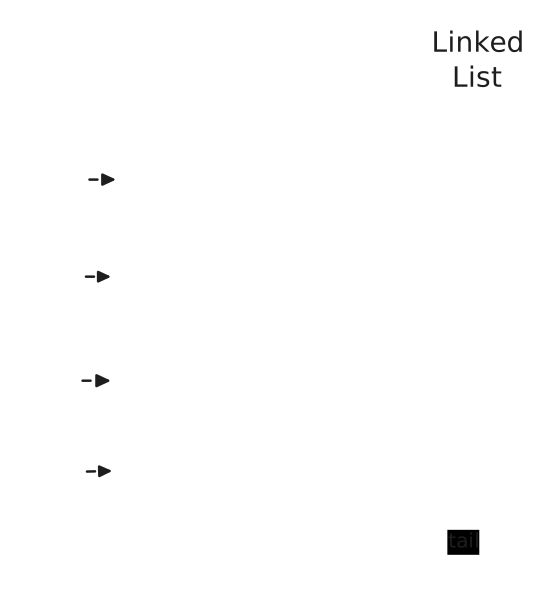
Visualization: Hash map provides O(1) lookups by slug, while the doubly linked list maintains access order. Most recently used items are at the head (green), least recently used at the tail (pink).
Storing 50 post-processed posts should be fair on resources. On average, I expect 30 bytes per slug, 4 KB per Post object, 40 KB per post-processed HTML, and 16 bytes per linked list node pointer. So for 50 posts, I should see < 5 MB of memory usage.
Slugs Cache
This one was admittedly an afterthought, but another important piece of caching. Without this, it could have lead to unbounded /blog/{rand-slug} requests hitting the database.
Previously I had had a simple handler on /blog/{slug} that would check for the slug in the cache, and if not there, then the database before returning a 404 if not found. While load testing locally using randomly generated URLs, I noticed my database service increase in CPU + memory usage by 10% when calling those URLs.
To combat this, I have added a long-lived cache for slugs that simply stores a map[string]int32 from slug to id. Now, blog page hits check for existence first before looking into the posts cache and falling back to the database. Afterwards, Postgres resource consumption under the same load testing constraint only saw around a 3% increase in usage. A major caveat being that this cache is the source-of-truth so it needs to be eventually consistent, and should never break.
Cache Strategy: - Key: Post slug - Value: Post ID - TTL: None (manual admin invalidation only) - Invalidation: On post C®UD operations - Initialization: Loaded from database on app boot
For the slugs cache, I expect about 40 bytes per slug at worst, each ID is an int32 therefore 4 bytes. Excluding map overhead, this would mean that at 100 posts, this would be < 4.5 KB. This slow-growing structure that will heavily reduce Postgres load on attacks is worth the caching.
Cache Invalidation Strategy
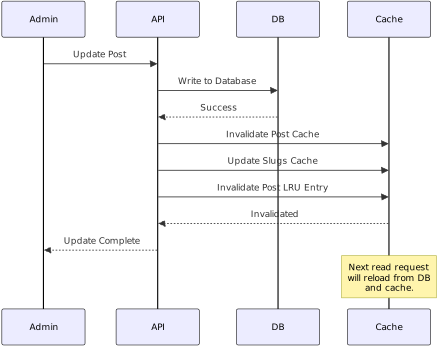
Cache invalidation is handled explicitly on write operations:
- Profile updates: Invalidate profile cache
- Experience CRUD: Clear experiences cache
- Post CRUD: Invalidate post cache (by slug) and update slugs cache
- Slug changes: Update slugs cache mapping
This ensures that readers see updates within one request cycle, while maintaining the performance benefits of caching for read-heavy workloads.
Cache Hit/Miss Tracking
All cache operations are tracked via Prometheus metrics and displayed in the admin analytics view:
- portfolio_cache_requests_total with labels bucket (profile, experience, post_list, post_by_slug, slug) and result (hit, miss)
This allows monitoring cache effectiveness and identifying optimization opportunities.
Storage
Cloudflare R2
For media storage, I chose Cloudflare R2 - an S3-compatible object storage service. R2 offers: - No egress fees: I would not have to worry about any possible visit increate leading to increased fees - S3-compatible API: Easy integration with existing AWS SDKs, so I could CRUD using the AWS Go API - Cost-effective: In the free tier, I’d have 10 GB of storage (which I don’t plan on exceeding.)
Based on the R2 Calculator, with: - 10 GB storage - 50 writes per month - 300000 reads per month - napkin math: 6 artifacts served per-post at 100 posts + 500 visitors per month - the latter being unrealistically generous. - 30% data transfer
It would cost $0/month. Whereas in others services, it could be \(0.21, or more. While cheap, it would still be breaking my already-broken cheap cost goal - I am currently spending \)2 over my $5 goal.
5000 visitors would still be at $0. It should take at least 16.6k visitors per month until costs accrue. I should be okay.
Storage Implementation
The storage layer uses the AWS S3 SDK (v2) configured to point at R2’s endpoint:
type R2Storage struct {
    config  *R2Config
    client  *s3.Client
    bucket  string
    baseURL string
}
Key Operations:
Upload:
UploadFile(ctx, storageKey, file, contentType)- Uploads file to R2 with proper MIME type
- Storage key format:
media/{uuid}.{ext}
Delete:
DeleteFile(ctx, storageKey)andDeleteFiles(ctx, []storageKeys)- Supports single and batch deletion
- Used when posts are deleted (cascade) or artifacts are removed
URL Generation:
GetFileURL(storageKey, resourceType)- For images: Uses Cloudflare’s image transformer endpoint (
/cdn-cgi/image/width=auto,format=auto/), which optimizes image transfered based on client.- Note, the image transform has its own costs.
- For other types: Returns direct R2 URL
- For images: Uses Cloudflare’s image transformer endpoint (
Artifact Management
The artifact table serves as the bridge between posts and stored files:
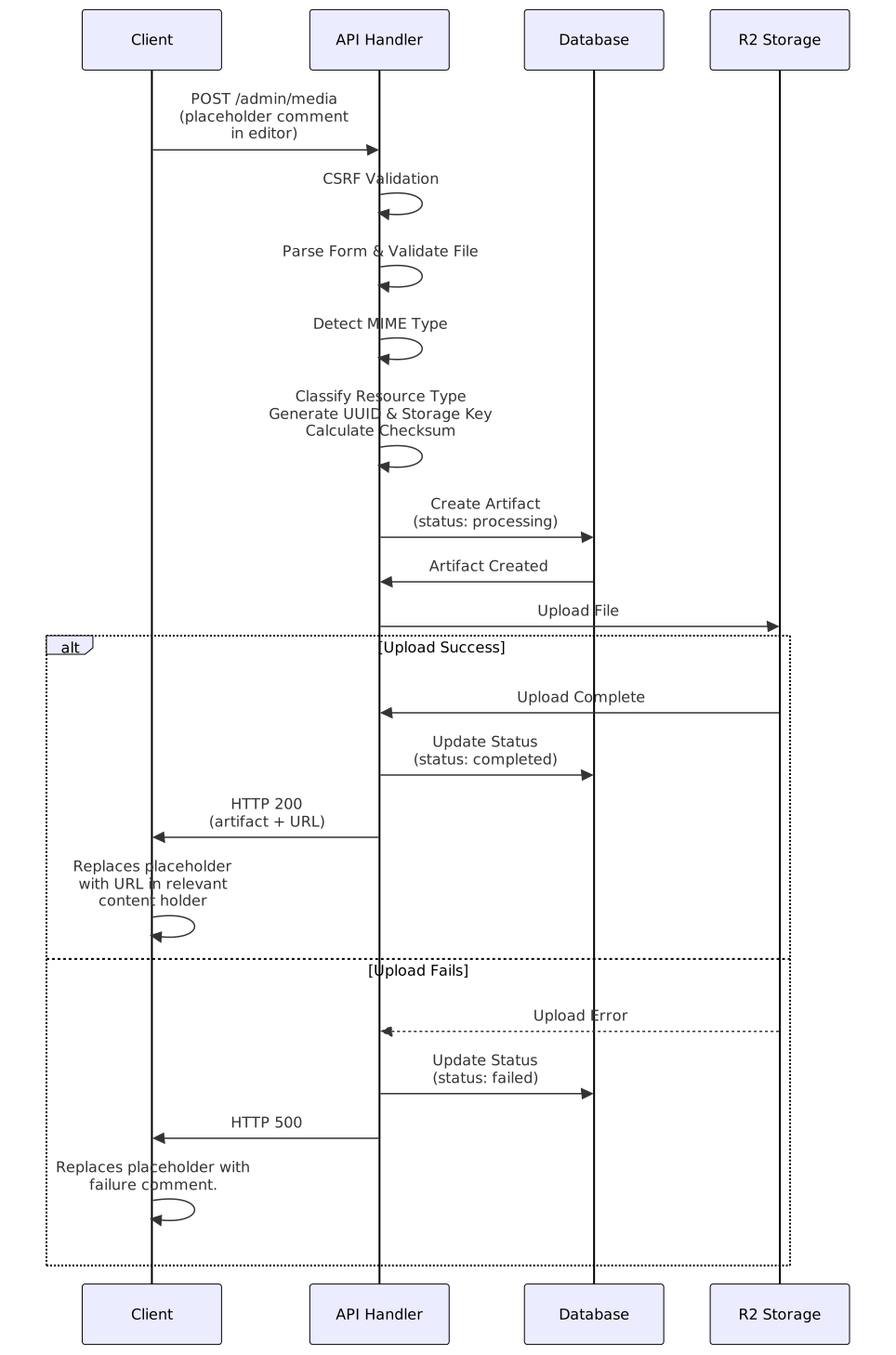
Upload Flow:
- Generate UUID for artifact
- Create artifact record with
status = 'processing' - Upload file to R2
- Update artifact with key and
status = 'completed'(or'failed'on error)
Draft Support:
post_idcan beNULLduring draft creation- Artifacts can be uploaded before a post exists
- When post is published, artifacts are linked via
post_id - If post is never published, there is an unused artifact in the table, making it easy to clean.
Integrity:
- SHA256 checksum stored for each artifact
Cleanup:
- Foreign key cascade:
ON DELETE CASCADEensures artifacts are deleted when posts are deleted - Manual cleanup available for orphaned artifacts
- Foreign key cascade:
Resume Storage
The profile table includes a resume field that stores the storage key for a PDF resume. The resume is stored at a fixed path (resume.pdf) to ensure there’s only ever one resume per profile. When a new resume is uploaded, the old one is automatically deleted.
Performance Considerations
Database Connection Pooling
PostgreSQL connections are managed via pgxpool, which provides:
- Connection pooling: Reuses connections instead of creating new ones
- Configurable limits: Max connections, idle timeouts
- Health checks: Automatic connection validation
For my small portfolio + blog, a pool of 5-10 connections should be sufficient.
Query Optimization
- Index usage: All frequently queried columns are indexed with appropiate index labels
- Pagination: Cursor-based pagination for post listings (covered in API architecture post)
Memory Management
- Cache size limits: LRU cache prevents unbounded growth
- TTL expiration: Automatic cleanup of stale cache entries
- Lazy loading: Caches are populated on-demand, not pre-warmed
- With the exception of the slugs cache, which is required to avoid false
404s.
- With the exception of the slugs cache, which is required to avoid false
Bandwidth & Storage Optimization
- Image optimization: Cloudflare’s automatic image optimization reduces bandwidth
- CDN caching: Static assets are cached at the edge
Conclusion
The data layer for this blog prioritizes simplicity and performance. With PostgreSQL for structured data, in-memory caching to avoid frequent database access & processing, plus R2 for media storage, I created a system that:
- Maintains low latency: Sub-250ms response times
- Stays resource-efficient: Total memory usage < 10MB for caches
- Remains simple: No complex distributed systems or message queues, as they are not necessary.
For a small blog, portions of this architecture are likely overkill. Even so, it should hopefully have a solid foundation that will grow with traffic while remaining maintainable and cost-effective.
In the next post of this series, I will cover monitoring and analytics, which help visualize if I need to cut back on unnecessary services.